CPTR 124 Fundamentals of Programming
In this lab you will use conditional execution to allow methods to vary their behavior based upon their input parameters.
- Teams
You are encouraged to work with a partner for this lab. You and your partner should begin thinking about the problems and begin writing the code before lab time.
- Preparing your working folder
Make a subfolder named Lab4 within your H:\cptr124 folder.
- Process Five
Develop a simple class named ProcessFive with the following methods:
- maximum() returns the maximum of the five integer
parameters passed to it. Be sure to handle ties
properly. For example, if pf is a
ProcessFive object, then
pf.maximim(2, 34, -2, 8, 1)
would be 34.
- minimum() returns the minimum of the five integer
parameters passed to it. Be sure to handle ties
properly.
- hasDuplicates() returns true if any of the
parameter values are duplicated. If all the
parameter values are unique, the method returns
false.
For example, if pf is a
ProcessFive object, then
pf.hasDuplicates(2, 34, -2, 8, 1)
would be false, but
hasDuplicates(2, 34, 2, 8, 1)
would be true.
- maximum() returns the maximum of the five integer
parameters passed to it. Be sure to handle ties
properly. For example, if pf is a
ProcessFive object, then
- NumberToText
Develop a class named NumberToText with a single method named toText(). The method accepts a single integer parameter and returns a string consisting of the English text representation for that number.
Some specifics:
- The method should be able to handle any integer from -100 to 100.
- Values less than -100 result in the text "too small," and
values greater than 100 result in the text "too big."
- There are 203 possible strings that your method can return.
You may not use 203 if statements as shown in the
following code fragment:
  .
  .
  .
if (n == 34) {
    result = "thirty-four";
} else if (n == 35) {
    result = "thirty-five";
} else if (n == 36) {
    result = "thirty-six";
  .
  .
  .
You must use if statements for your conditional checks, but you are limited to 50 or fewer if statements within your code.
- Look for common properties that can reduce the number of required
if statements. Any value between 71 and 79 would have
the prefix "seventy-", for example. The ones
digit to follow would be determined by a subsequent
if statement
(via the modulus of 10) and concatenated to the result.
- Treat the values 10-19 as special cases since their names
are irregular. For example, 23 is "twenty-three," but 13 is not
"ten-three."
- There many ways that the problem can be solved. One
approach uses the following logic flow:
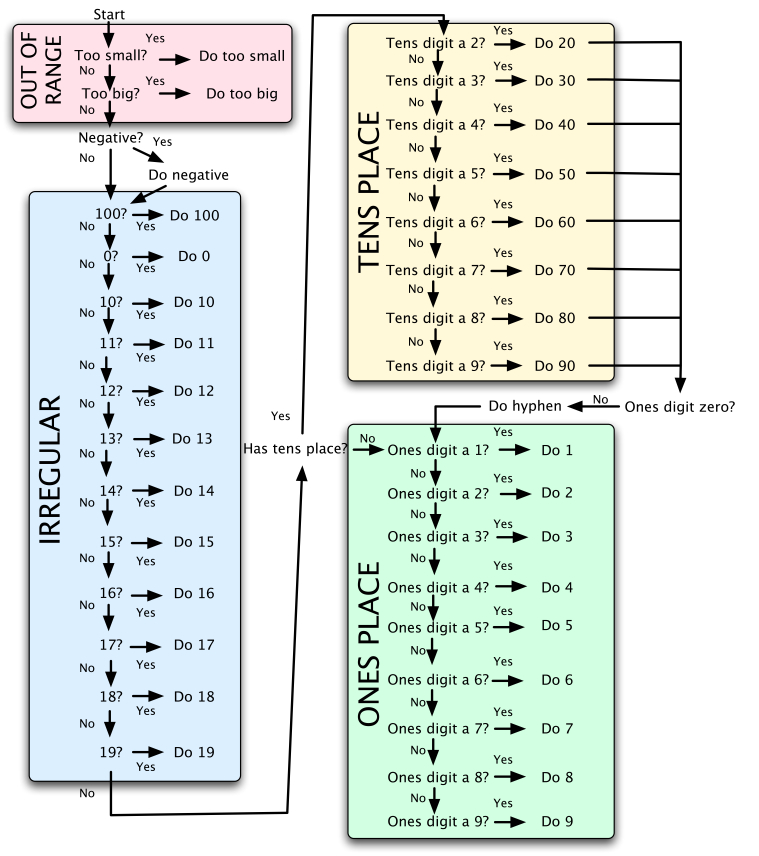
Do not include capital letters in your string result, and do not include any extraneous spaces. Example strings are "negative thirty-five" for -35, and "four" for 4.
After you have done some testing by hand in the Interactions pane, copy the NumberToTextTester and LabeledSlider clases from http://perl.cs.southern.edu/repository/124Labs/Lab4 to your working directory. These classes provide a nice graphical enviroment for thoroughly exercising your number to text converter objects. Your NumbertoText class should integrate with these classes without modification. Compile the NumberToTextTester class, press Run and see if things work as they should.
- The method should be able to handle any integer from -100 to 100.
- Check out
Demonstrate that your ProcessFive and NumberToText work correctly. Print out your class definitions. Be sure your name is on each sheet and staple them together. If you worked with a partner, please submit only one set of printouts with both names on it.
You will be asked to provide a copy of your NumberToText source file on a provided USB drive. It will be thoroughly tested for correctness. Be sure to provide a comment within your source code that includes your name and your partner's name.