CPTR 124 Fundamentals of Programming
This lab provides more experience making classes for objects.
- Teams
You are encouraged to work with a partner for this lab. You and your partner should begin thinking about the problems and begin writing the code before lab time.
- Preparing your working folder
Make a subfolder named Lab7 within your H:\cptr124 folder.
- What to do.
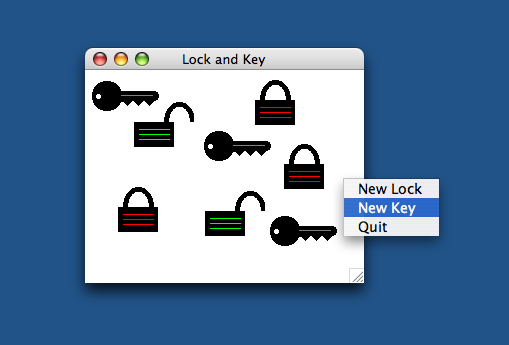
The program for this lab allows users to manipulate graphical locks and keys within a window. Like the TrafficLightModel and TextTrafficLight view examples in your textbook, we will separate the lock model from its view.
Your task is to write two relatively simple classes: LockModel and KeyModel. I provide the view and take care of all the graphics and user interaction.
Your KeyModel class must provide the following constructor and public method:
- public KeyModel(int code) The constructor accepts an integer code. This code represents the key's unique value that can be used to unlock LockModel objects (see below) with matching values. Each key object must maintain its own code.
- public int getCode() This method returns the key's code.
Your LockModel class must provide the following constructor and public methods:
- public LockModel(int code) The constructor accepts an integer code. Each lock object must maintain its own code. When attempting to unlock this object, a KeyModel object must provide this exact code in order to unlock this lock. If the key has a different code, it cannot unlock this object.
- public boolean isLocked() This method returns true if the lock is currently locked; otherwise, it returns false. Obviously each lock object must maintain a knowledge of whether of not it is locked.
- public boolean unlock(KeyModel key) If key's code matches the code of this lock, the lock is unlocked and true is returned; otherwise, the lock's status is unaffected and false is returned.
- public void lock() This method locks the lock. No key is needed, as anyone can lock a lock object at anytime, but only those with the proper key can unlock an object.
So, you must come up with key model objects that keep track of their codes, and lock model objects that keep track of their codes and whether they are locked or unlocked. I provide all the other code. In order for my code to work with your code, you must implement the object interfaces specified above exactly. While you will need to add other things to your classes to make them work, everything except the methods mentioned above should be private.
As in an earlier lab, you need the oopj.jar file on your system (the lab machines already have it) for the graphics to work properly.
My code consists of the following three classes: LockView.java, KeyView.java, and LockAndKeyViewport.java:
- The user experience
To use the program, position the mouse cursor at a location within the window where you wish a lock to appear. Click the right mouse button for a context-sensitive popup menu. Select the New Lock to make a new lock, New Key to make a new key, or Quit to terminate the program. If you choose to make a new lock or key object, you will be prompted for the lock's or key's integer code. You can depress the left mouse button over a lock or key and drag it around within the window. If you draw a key over a locked lock and the key's code matches the lock's code, the lock will unlock (be sure the crosshair-shaped cursor is over the area of the lock to open). If the key's code does not match the lock's code, the lock will remain locked. A single left click over an open lock will close it--no key is necessary to lock a lock.
- Check out
Your finished program will be evaluated for correctness and compliance. When approved, you should submit printouts of your KeyModel.java, and LockModel.java sources files. Be sure your name and your partner(s) names are included on the printout.