CPTR 124 Fundamentals of Programming
In this lab you will write functions that control the logic of a graphical Tic-Tac-Toe game.
- Teams
You are welcome to work with a partner on this lab. You and your partner should begin thinking about the problems and begin writing the code before lab time. You may work by yourself if you wish.
- What to do
For a background on the Tic-Tac-Toe game, see http://en.wikipedia.org/wiki/Tic-tac-toe. Your task is to provide the controlling logic for a graphical two-player Tic-Tac-Toe computer game. Since it is a two-player game, your program does not play against a human opponent but simply allows the user(s) to interact with the board, making marks with the mouse. Your code must ignore illegal moves like trying to make a mark over an existing mark. Your code controls whose turn it is and detects when the game is over.
Study the comments in the ttt_logic.h header file. The header file contains the definitions of a number of constants and the prototypes for five functions:
- The constants represent the players (X and O),
the positions on a Tic-Tac-Toe board, and
end game board configurations.
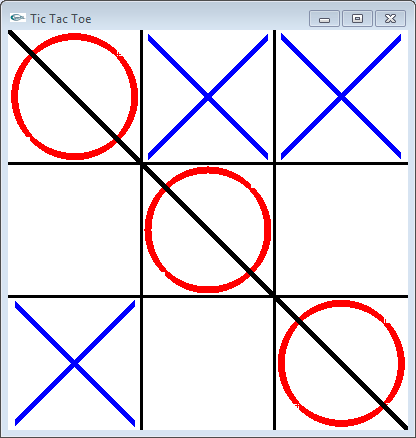
- check_status determines if one player has
won, the game is a draw, or if the game can continue.
It returns a constant the graphical system can use to
render the board properly; for example, if a player has
three marks in a line from the northwest corner of the board
to the southeast corner, the graphical system would
draw a line through the marks indicating the player
has won the game (see the figure below).
- move puts the mark of a player in a given
square, if possible. The exact mark depends on
the player with the current turn. A mark may be placed
in a square only if the square is unoccupied.
- look returns the mark in a particular square
or a result indicating the square is empty. The graphical
system uses the look function to determine
what if anything to draw in a given square.
- clear_board clears all marks off the board
making it ready for a new game. It also makes player X
the current player. The function should reset any
data the program may be using to monitor or control
the progress of a game.
- current_player returns the player whose turn it
is.
Think about it: If you can clear the board, put marks in specified squares, see what is in a given square, and check to see if the game is over or should continue, you have all the pieces necessary to model the control logic for a two-player Tic-Tac-Toe game.
- The constants represent the players (X and O),
the positions on a Tic-Tac-Toe board, and
end game board configurations.
- Code Organization
Add tictactoe.cpp and ttt_logic.h to your project. Create a file named ttt_logic.cpp. In that file implement the functions declared in ttt_logic.h. The comments in ttt_logic.h provide additional detail about what the functions do.
For this assignment you need to add global variables that maintain the state of the game. Declare global variables you use in ttt_logic.cpp as static. The static qualifier renders a global variable inaccessible to code outside of the file in which it is declared. (When we cover objects later we will find a better alternative to global variables.) You should use these variables to store the marks in each location on the board and to keep track of whose turn it is. You may want to use a variable to keep track of the number of moves made in the current game; once the players together have made nine legal moves and no winner has been detected the game must be over with a tie.
Important!. You should not modify the files ttt_logic.h and tictactoe.cpp; they must be used as is. Also, your ttt_logic.cpp file should contain NO input or output statements; that is, cout and cin should not appear in your code. It is fine to use cout statements during development to help debug your code, but you should remove them when your work is complete.
- Testing
When you are finished, thoroughly play with your Tic-Tac-Toe game, trying all combinations moves, to ensure that your logic is correct.
- Check out
Your finished program will be evaluated for correctness and compliance. Double check to ensure the following:
- that your ttt_logic.cpp file
contains no cout or cin statements,
- that your ttt_logic.cpp file builds properly with the
unmodified ttt_logic.h and
tictactoe.cpp files, and
- that two players can play the graphical Tic-Tac-Toe and things work as they would in the paper version.
Follow the special instructions given during lab for the evaluation component. When approved, you should submit your C++ source file to eclass. Be sure your name (and your partner's name, if necessary) are included in comments at the top of each source file.
- that your ttt_logic.cpp file
contains no cout or cin statements,