COSC 122 Programming II
In this assignment you will use some of Java's standard graphical user interface components to build a simple GUI. You also will explore some Java listener classes to enable the user to interact with the GUI.
- Teams
You are encouraged to work with a partner for this assignment. You and your partner should begin thinking about the problems and begin writing the code before lab time.
You may work by yourself if you prefer.
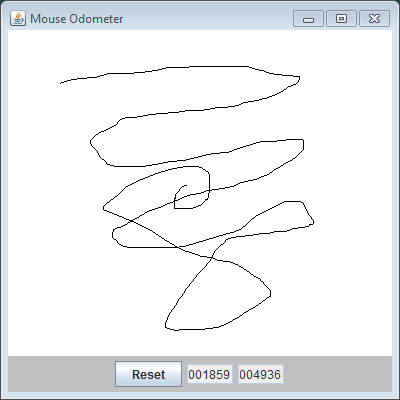
- Write a graphical application that implements a mouse
odometer. As the mouse moves across a drawing panel,
the odometer
is updated to indicate the distance the mouse pointer has moved
in pixels. The odometer is updated only when the user is
dragging the mouse (i.e., moving the mouse while the left button
is held down). When dragging the mouse the drawing panel
should draw the mouse's path.
Your user interface should supply a drawing panel (a subclass of JPanel), two textboxes and one button that behave as follows:
- The drawing panel allows the user to draw a mouse
trail within the panel. The user draws a trail by
pressing and holding down the left mouse button.
The tail forms as the user moves (drags) the
mouse. The trail is complete when the user
releases the left mouse button (that is, is
finished dragging). When the user subsequently
presses the left mouse button, the previous trail
disappears, a new trail is formed.
- The first textbox represents an odometer that
holds the the length in pixels
of the user's current trail. This odometer resets
automatically when the user begins a new trail.
- The second textbox represents an odometer that
stores the
cumulative distance of all the trails the user has
made since the program began executing. This
odometer does not reset automatically; the user
must intentionally reset this second odometer.
- The button should reset the cumulative odometer when pressed. Use a JOptionPane dialog box to confirm the user's decision to reset the odometer. At this point the user can continue or cancel the reset operation.
You may use the Doodle program we wrote in class as a starting point for your code for this assignment.
- The drawing panel allows the user to draw a mouse
trail within the panel. The user draws a trail by
pressing and holding down the left mouse button.
The tail forms as the user moves (drags) the
mouse. The trail is complete when the user
releases the left mouse button (that is, is
finished dragging). When the user subsequently
presses the left mouse button, the previous trail
disappears, a new trail is formed.
- Details
The applicaton's window is a stock JFrame object. To the window frame add a custom JPanel that provides the application's complete functionality. Implement the following classes for your program:
- Odometer. Your two odometer
objects should be instances of Odometer, a
subclass of JTextField.
Unlike a basic JTextField object,
your Odometer objects maintain an
integer value that keeps track of their
distance. Your class should provide these
methods:
- set: sets the odometer object's internal value to an arbitrary integer value passed by the client.
- reset: sets the odometer object's internal value to zero.
- increment: increases the odometer object's internal value by an integer amount passed by the client.
JTextField objects are editable by default. You can make them non-editable by calling the setEditable method with the argument false. Make your odometer objects non-editable in the constructor.
Too get the odometer to read 000000 instead of just 0, use a DecimalFormat object.
Other than the extra methods that you add, your Odometer objects will behave just like JTextField objects and can be used everywhere JTextField objects are accepted.
- DrawingPanel. Design a class named
DrawingPanel that is
a subclass of JPanel. In addition to
subclassing JPanel,
DrawingPanel will implement the
interfaces MouseListener and
MouseMotionListener.
This panel class is very similar to the panel
class in our Doodle program, and you
can use the class from Doodle as a
starting point for the DrawingPanel
class.
A DrawingPanel object will draw the
mouse trail and react to the user's mouse
dragging and mouse button presses and
releases, just like the panel used in
Doodle.
The DrawingPanel object needs to know
about the two Odometer objects
because moving the mouse increments the
odometers. Each time the user drags the
mouse, compute the distance between the new
point and the last point added to the
the ArrayList of
points.
Recall from mathematics that the distance between two points (x1, y1) and (x2, y2), is given in the following formula:

You may use the Math.sqrt method to compute the square root of a number.
Increment the two odometer objects by the computed distance. You must perform this update for each mouse dragged event.
Each time the user presses the left mouse button within the DrawingPanel object to begin a new sketch, the ArrayList of points is cleared. Dragging the mouse then adds points to the list of points. This behavior is the same as Doodle. Additonally, each time the user presses the left mouse button to begin a new sketch, you must reset the current odometer to zero. Do not touch the cumulative odometer at this point.
- OdometerPanel. You will add an
instance of
this custom class to your JFrame
window. All this class needs is a custom
constructor that adds all the necessary
components. In order to achieve the correct
arrangement of components, use
a BorderLayout manager for your
OdometerPanel panel object.
Add a DrawingPanel instance to the
CENTER and a standard JPanel instance
(which I called controlPanel) to the
SOUTH. The controlPanel object in
the SOUTH section simply holds
the Reset
JButton and the two odometer objects.
The controlPanel object should use the
JPanel's default FlowLayout
layout manager. The background color of this
controlPanel object is light gray.
The Reset button asks for a confirmation before resetting the cumulative odometer.
The OdometerPanel object itself does not respond to any user input events. It serves merely as a container to organize the layout for the other two panels. The OdometerPanel's contained DrawingPanel object does respond to user mouse events (as in Doodle), and the Reset button contained in its other panel does respond to user button presses.
In the Doodle program we added the equivalent of the DrawingPanel object directly to the JFrame window. For this assignment, we want to add the DrawingPanel instance and JPanel (control panel) instance to an instance of OdometerPanel, and then add this OdometerPanel object to the JFrame window. The exploded view of the visual components are shown here:

Summary: The user draws on the drawing panel. A control panel contains the Reset button and two odometer objects. A main panel contains both the drawing panel and the control panel. The window frame contains this main panel.
The drawing panel responds to mouse events. The Reset button reacts to user presses. The application responds to no other user input events.
- Odometer. Your two odometer
objects should be instances of Odometer, a
subclass of JTextField.
Unlike a basic JTextField object,
your Odometer objects maintain an
integer value that keeps track of their
distance. Your class should provide these
methods:
- Check out
Your finished program will be evaluated for correctness and compliance.