CPTR 124 Fundamentals of Programming
In this lab you will implement several functions useful in analytic geometry.
- Teams
You are encouraged to work with a partner for this lab. You and your partner should begin thinking about the problems and begin writing the code before lab time.
- What to do
In this assignment you will work with three C++ source files:
-
geometry.h. This header file contains the declarations for six functions that you must implement. For this assignment you will implement five of the functions specified in this file. We will defer one of the functions until the next assignment. More information about these functions appears below.You should not touch the code in this file.
-
geometry.cpp. You will implement in this file the functions declared ingeometry.h. -
testgeom.cpp. This program uses the geometry functions, allowing a user to enter in the coordinates of two geometric points. The program then prints four things:- the distance between the two points,
- the slope of the line that passes through the two points,
- the y-intercept of the line that passes through the two points, unless the line is vertical; in which case the program prints the x-intercept of the line, and
- the equation of the line (in slope-intercept form) that passes through the two points.
You should not modify this program.
geometry.cppthattestgeom.cppwill use. The program found intestgeom.cppwill not work properly until you correctly implement the expected functions.The required functions are:
- distance
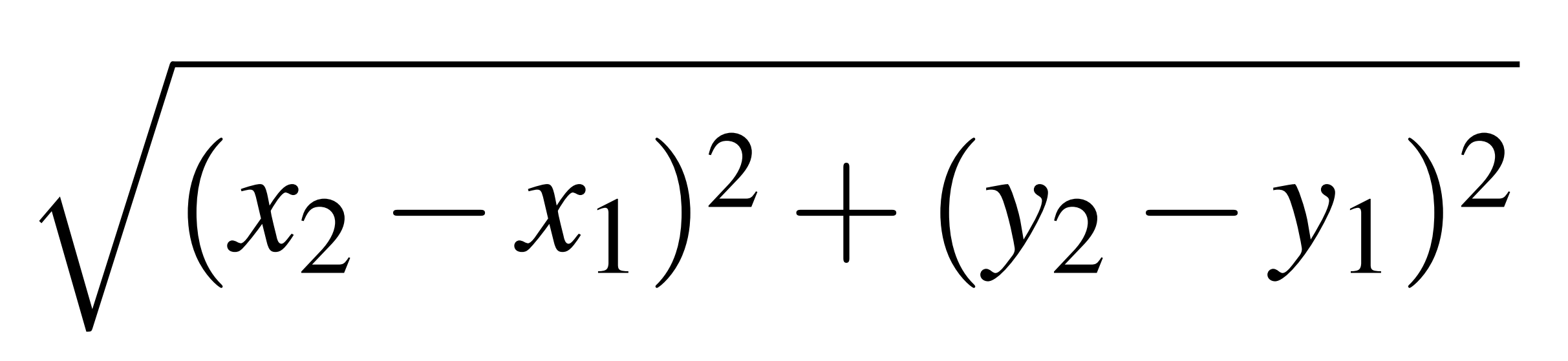
The distance between two points (x1, y1) and (x2, y2), is given in the following formula:
Write a function named
distancethat accepts four double-precision floating-point arguments x1, y1, x2, and y2, in that order, representing two geometric points (x1, y1), and (x2, y2). It should return the double-precision floating-point value representing the distance between the two points. You can compute the square root of a numeric value via thesqrtfunction found in the standard<cmath>library.The
distancefunction's prototype isdouble distance(double x1, double y1, double x2, double y2); - slope
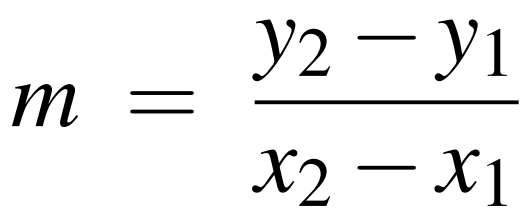
The slope of the line passing through two points (x1, y1) and (x2, y2), is the difference of the y values divided by the difference of the x values:
Write a function named
slopethat accepts four double-precision floating-point arguments and returns the double-precision floating-point value representing the slope of the line passing through the two points represented by the arguments.The
slopefunction's prototype isdouble slope(double x1, double y1, double x2, double y2);Watch out for vertical lines! Return the predefined constant
INFINITY(defined in<cmath>) to represent infinity if the line is vertical.Note: The function's behavior is undefined for parameters that represent two equal points. When we say the function's behavior is undefined, we mean you do not need to worry about what your function does if the client attempts to compute the slope with two points that are the same. (Later in this course we will consider how to properly handle such exceptional situations.)
- intercept
An intercept is a number that represents a location on an axis where a line intersects that axis. The y-intercept of a line is the y value of the point where a line crosses the y-axis. Write a function named
interceptthat accepts four double-precision floating-point arguments representing the coordinates of two points. The function ordinarily returns the double-precision floating-point value representing the y-intercept of the line that that passes through the two points defined by the arguments.For non-vertical lines, we can compute the y-intercept from the y = mx + b form of a line. Solving for b, we get b = y - mx:
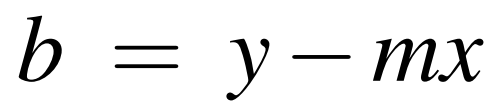
This means if we know the slope, m, we can plug in the (x, y) coordinates from either point to compute b.
The
interceptfunction's prototype isdouble intercept(double x1, double y1, double x2, double y2);Vertical lines do not have a y-intercept, so the
interceptfunction instead should return the x-intercept for vertical lines. If the two points form a vertical line, it is easy to determine the x-intercept.Note: The function's behavior is undefined for parameters that represent two equal points. Again, this means you need not worry about this possibility in your function.
- intersection
You do not need to implement this function at this time. You will implement it for the next assignment.
- print_point
Given the x and y coordinates of a point, this function prints the point to an output stream object in a human-readable manner as it would appear in a mathematics book. The call
print_point(2, 3, std::cout);would print
(2,3)The function's prototype is
std::ostream& print_point(double x, double y, std::ostream& os);The function returns the same output stream object passed to it from the caller.
- print_line
The equation of a line in slope-intercept form is
y = mx + b where m is the line's slope, and b is the line's y intercept.Write a function named
print_linethat accepts two double-precision floating point arguments representing the slope and y-intercept of a line. The function should print the equation of that line in slope-intercept form. The function returns nothing. Its prototype is:std::ostream& print_line(double m, double b, std::ostream& os);Your equation should be "pretty," meaning do not print an equation like
y = -1x + -3rather print it asy = -x - 3and an equation likey = 20.5x + 0should be printed asy = 20.5xPlace spaces around the equals symbol and the addition and subtraction symbols so the equation appears as you might see it in a mathematics textbook. This means you will need some conditional statements within yourline_equationfunction to fine tune the exact output.If the first parameter passed to the function is
INFINITY(representing infinity), it represents a vertical line. The second parameter then represents the x-intercept instead of a y-intercept.A vertical line has the form
x = b where b is the x-intercept. Your function should print the equation for vertical lines correctly.As you begin developing your
print_linefunction do not worry about pretty formatting. First concentrate on getting the numbers correct, and after you are sure the results are mathematically sound then, if you have time, proceed to make the representation more attractive.If you do not have the time or interest to make the string "pretty," you may elect to receive 9/10 points for the assignment if your string is just mathematically correct.
-
- Organization
Copy the files
geometry.h,geometry.cpp, andtestgeom.pyto the same folder (or directory). Do not change the names of the files.Your task is to complete the functions (except for
intersection) ingeometry.cpp. Do not touch any of the code in the other files.Unlike all the previous programming assignments, the code you write is not in control. The code provided for you is in control, and your code must be able to react to it appropriately.
It is important that you not include any printing (except in
line_equation) or input statements within your functions. The code withintestgeom.cppis responsible for obtaining input from the user and displaying the results. Also, yourdistance,slope, andinterceptfunctions should perform no rounding. Callers can round the results you compute as they see fit. It is appropriate to round the floating-point values that you use to build the line equation string in yourline_equationfunction—round these to two decimal places. - Strategy
First download the three C++ source files. Before you touch the code in
geometry.cppmake sure that thetestgeom.cppprogram compiles and executes without any problems. Since you have yet to add your code to thegeometry.cppfile, the program will not produce the correct results, but it should build okay and not crash when executed. This is because the filegeometry.cppcontains five function stubs. They each return some default value that clients are able to use without crashing.To keep things simpler to begin with, don't worry about handling vertical lines and don't worry about "pretty" equation output. Make sure your code works properly with
testgeom.cppwith simple, limited examples. After everything works under those restricted conditions, then implement vertical line capability and afterwards pretty output. - Check out
Double check to make sure your
distance,slope, andinterceptfunctions are returning numbers and that they are doing no rounding. Yourline_equationfunction should be the only function withingeometry.cppthat containstd::cout.Your finished code will be evaluated for correctness and compliance. When approved, you should submit your
geometry.cppC++ source file to http://eclass.e.southern.edu. Be sure your name and your partner's name are included in comments in the first line of your source file.